Units & scale
Reads drawing units and flags uncertain scale. Unknown units need confirmation before you rely on dimensions.

 LEVRTEK 2D
Every contour. Every cut.
A clearer picture before the machine starts.
Inspect dimensions, cut lengths, pierces and geometry issues. Straight from your drawing, in your browser.
Drop one or more manufacturing drawings to inspect
Up to 10 files · 10 MB per fileYour files stay on this device. No upload, no account.
DRAWING CHECKS
Small details in a drawing can become expensive details on the floor. Here’s what the analyser looks for.
See it in the sampleReads drawing units and flags uncertain scale. Unknown units need confirmation before you rely on dimensions.
Finds open paths and gaps between endpoints, including shapes that look closed on screen.
Finds overlapping geometry that could cause a double cut or inflate the total cut length.
Flags very short or zero-length entities left behind by an edit or export.
Highlights where a profile crosses itself, so you can review the intended cut path.
Reports what could not be read and which geometry was approximated during analysis.
Checks changes in direction where lines and arcs meet. Sharp corners may be intentional.
Distinguishes outer profiles, internal holes and disconnected parts, and surfaces multiple profiles for review.
TRY THE GEOMETRY YOURSELF
Four familiar outlines. Six holes. A duplicated line and an unfinished slot. Explore the logo drawing and see what the analyser picks up.
FICTIONAL SAMPLE / DELIBERATE GEOMETRY ISSUESReview flagged geometry before relying on cut totals or pierce counts.
Select a finding to highlight the affected geometry. Try this same DXF in the hero above, or drop in your own drawing.
Open LEVRTEK 2D App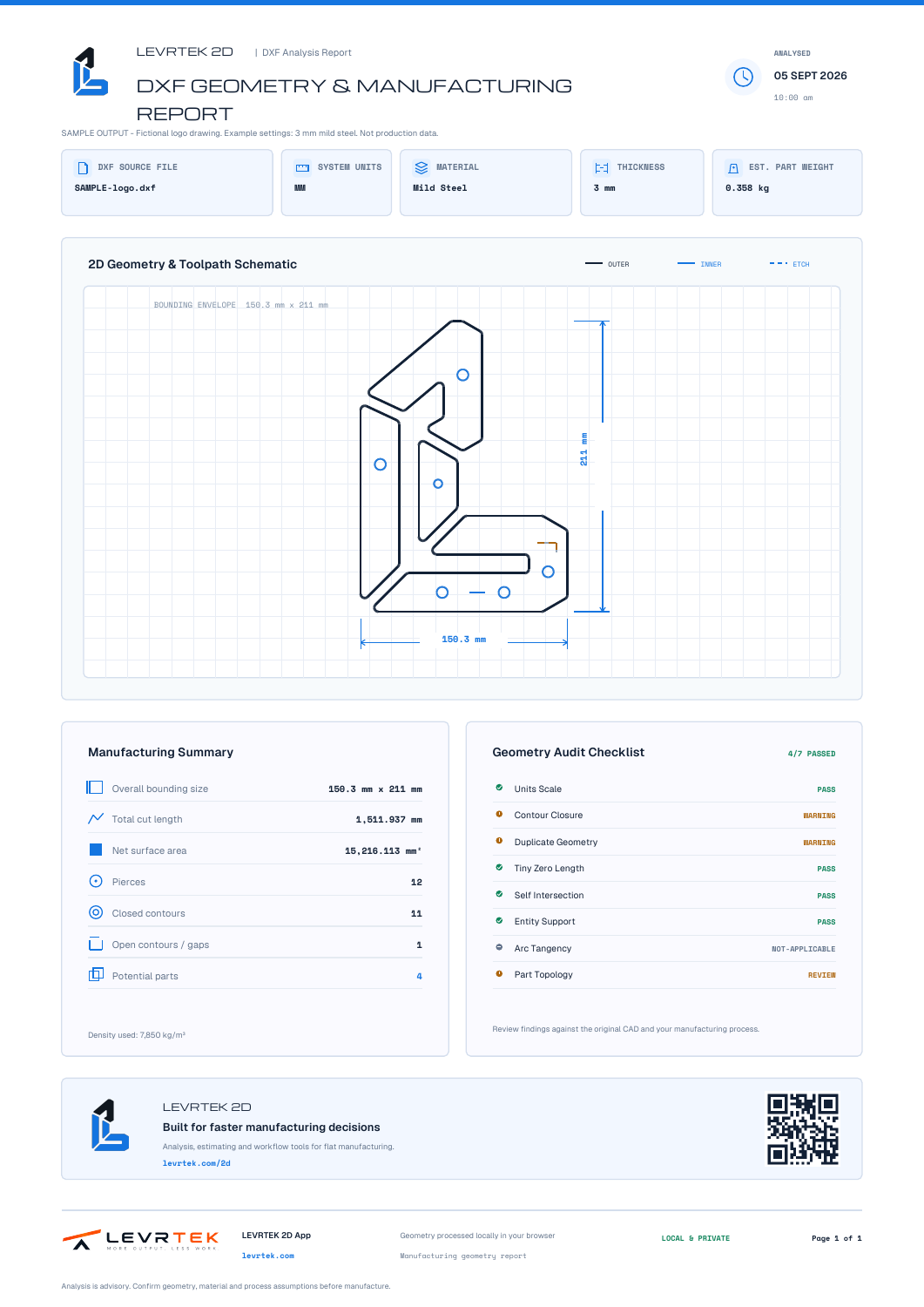
SOMETHING TO TAKE WITH YOU
See what the output looks like before you open a file. This is the report for our DXF sample, exported from the analyser.
A4 / PDF
Fictional drawing with deliberate issues. Example material settings: 3 mm mild steel.
FROM GEOMETRY TO THE JOB
Good estimates start with good geometry. We’re building the next step: connecting your part data with the materials, processes and costs behind the job.
DXF geometry and part detail
Dimensions, cut lengths and checks
Materials, process and job costs
BEFORE YOU START
A few things worth knowing about the tool and your drawings.
No. The LEVRTEK 2D App opens in your browser and does not require an account. Open a DXF, review its geometry and inspect the measurements without installing a CAD package.
The DXF analyser reads and processes geometry locally in your browser. Opening a drawing does not upload it to a LEVRTEK server. Optional product analytics are separate and require consent; drawing content is excluded.
It inspects dimensions, cut length, contours, pierces and area, and flags geometry that may need attention, including open contours, duplicate vectors and unsupported entities. Results depend on the source file, its units and the geometry it contains.
Use the analysis to support your review. Verify units, dimensions, material, tolerances, source revisions and machine requirements before manufacture. An analysis is not an approval to cut.
The DXF analyser measures geometry. Cost modelling, estimating and nesting are being developed for the paid estimator. Availability, pricing and the final feature boundary are still to be confirmed.
BUILT AROUND THE WAY YOU WORK
Join the LEVRTEK 2D mailing list for product updates and news about the estimator. We’ll let you know when there’s something worth opening.
Analyser improvements. Estimator access. Useful updates.